The Security Vulnerabilities of The Target="_Blank" Attribute
The HTML hyperlink tag allows you to create an element that can be clicked on to reference another document or section on a web page. Hyperlinks are defined with the HTML <a> tag like so:
<a href="/about">About Page"></a>
HTML Target Attribute
While the href attribute specifies the destination address of the link, another common attribute is target which is used to specify where to open the destination address of the link. You can either open the link in:
- _self - This would open the link in the same window or tab as it was clicked (PS: This is the default for all links)
- _blank - This would open the link in a new window or tab
- _parent - This would open the link in the next level parent frame. If there is no parent, it behaves like
_self - _top - This would open the link in the topmost frame of the window. If there is no top frame, it behaves like
_self
Most often, you'll find yourself only using the _blank target attribute than others since the frame, and frameset tags are obsolete in HTML5.
The Vulnerabilities
Every new window has the opener API, and when you click on an external link with target="blank, the new tab has a window.opener which points to the parent window and can run on the same process as the parent (unless site isolation is enabled). So when a user clicks the external link, the new page opened has control over the parent document's window object.
Since the new page can access the parent window object with the window.opener property, it can redirect the external page to a malicious URL, which makes your site or users vulnerable and exposed to data theft or other phishing attacks (and since users trust your website already, they can easily be a victim).
window.opener.location = newURL
Phishing is the fraudulent attempt to obtain sensitive information such as usernames, passwords and credit card details by disguising oneself as a trustworthy entity in an electronic communication. ~Wikipedia
The Solution
When using the target blank attribute, please ensure to add rel="noopener noreferrer" attribute to avoid exploitation of the window.opener API available on every page.
Adding the rel="noopener noreferrer" attribute on the parent <a> element will allow the new window run in a separate process and prevent the window.opener reference from being set, which means the property will equal null.
var newWindow = window.open();
newWindow.opener = null;
newWindow.location = url;
When a user moves from URL A to URL B, URL B still receives information (like traffic data) about the previous web location (URL A) even though it's owned by a different user. Adding the rel="noreferrer" attribute on the parent would prevent sending request "referrer" header information between both locations.
- rel="noopener" protects a new window to be accessed by the window.opener property from an external window and make sure it runs in a separate process.
- rel="noreferrer" is similar to noopener, except that it also prevents the destination window from seeing the referred URL.
<a href="https://hashnode.com/devblog" target="_blank" rel="noopener noreferrer">
  Create your Devblog today
</a>
By adding the rel="noopener" or rel="noreferrer" attribute to an external link, it will prevent a new tab from taking advantage of the JavaScript window.opener property which therefore improves the security and performance of your site (since the new window is running on a separate process, any script on it won't affect the referring or parent window).
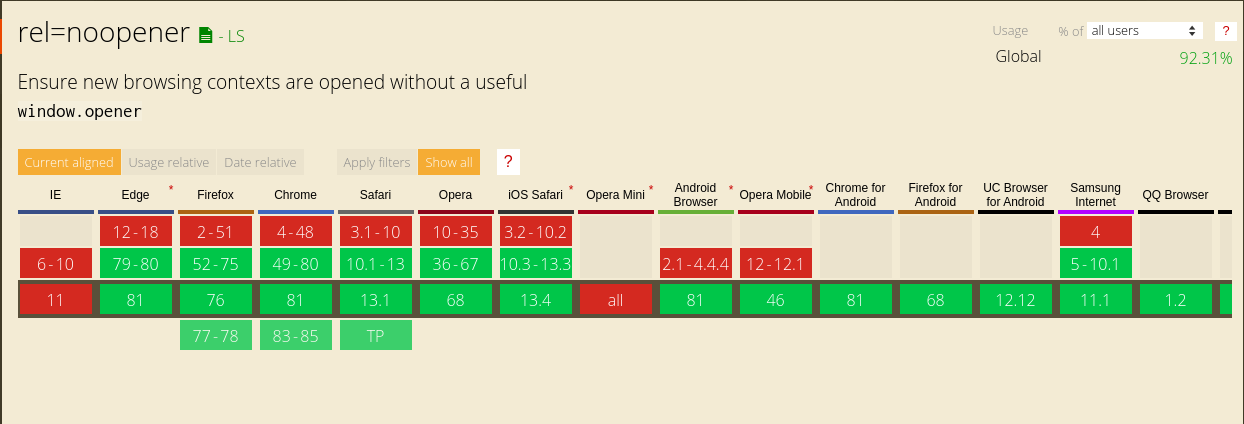
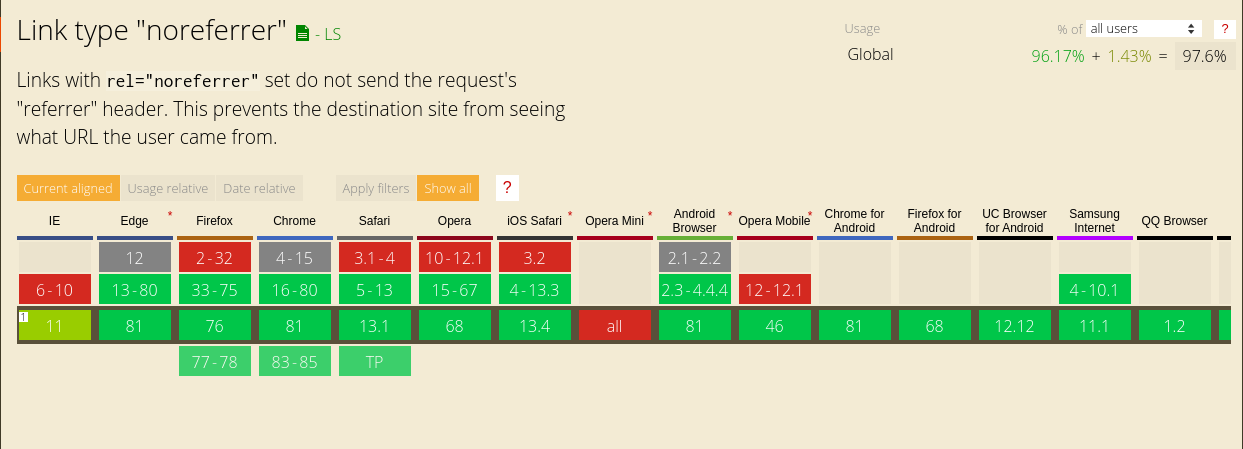
Browser Support
About the author
undefined or mostly null.
Comments
Join the discussionThanks for sharing, I've always wondered why React keeps yelling at me to include that attribute.
thanks so so much for sharing this, I have something to make reference to.
That is truly incredible. Thank you for sharing the knowledge Balaji. I had been blindly using this target='_blank' for many years, without really giving a thought about the technicalities and the possible vulnerabilities if any.
It is a master piece ;)
Thank you for reading, I'm glad this was helpful.
Interesting!
Valuable post, was able to gain a lot from your post
Glad I could help, thanks for reading.
Now I fully understand the warning message reactjs displays in my console; that using target="blank" without rel="noopenner noreferrer" is discouraged.
Thanks Bolaji Ayodeji for this insightful article.
Glad it helped you :)
Wow! Thanks for this valuable piece.
Wow! Never knew this until now and I make use of the attribute a lot. Thanks for this chief!
Thanks for sharing!
I just pushed a bug fix to one of my repos 😄
Ahh, glad I could help.
😂😂. Nice one!
Web Engineering
In this series, I will share articles related to best practices for building and deploying applications on the web with the JavaScript and Python programming languages.