The HTML list tag allows you to list ordered and unordered items. One major UI problem I had with list items is the position of the ::marker (bullet) pseudo-element in a list item.
The
::markerpseudo-element selects the marker box of a list item, which contains the list bullet or number to display the list item. This is used in tags like<li>and<summary>elements.
Sometimes, the list item's bullet has some left margin irregularities which make lists not so good looking with respect to the page's default spacing layout. I had to solve this by hacking the extra spacing and adding some left margin.
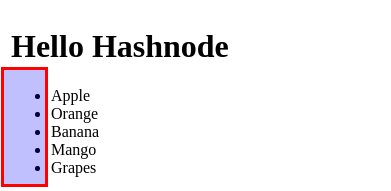
Today I learned about the CSS list-style-position property that sets the position of the ::marker relative to a list item and allows you to decide the position of the bullet.
list-style-position: inside
Here, the ::marker is the first element among the list item's contents; hence the bullet will be inside the list item.
<ul>
  <li>Apple</li>
  <li>Orange</li>
  <li>Banana</li>
  <li>Mango</li>
  <li>Grapes</li>
</ul>
ul {
  list-style-position: inside;
}
list-style-position: outside
Here the ::marker is outside the element's box; hence the bullet will be outside the list item. This is the default position of a list item.
<ul>
  <li>Apple</li>
  <li>Orange</li>
  <li>Banana</li>
  <li>Mango</li>
  <li>Grapes</li>
</ul>
ul{
  list-style-position: outside;
}
You can use some global syntax values.
list-style-position: inherit;
list-style-position: initial;
list-style-position: unset;
Browser Support
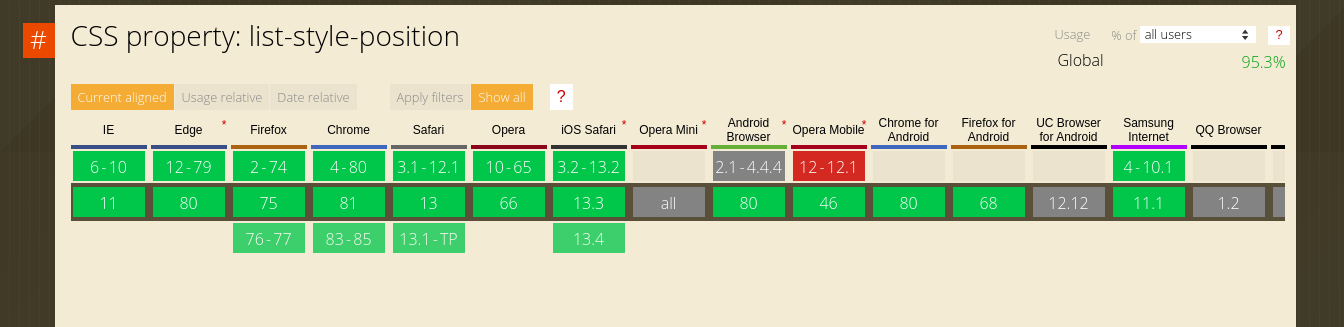
src="https://caniuse.com/#search=list-style-position"
About the author
undefined or mostly null.
Comments
Join the discussionI was experimenting with this yesterday and I used the ::marker pseudo class to change the size of the list marker independent of the font size of the list itself. Worked in Firefox but didn't in chrome.
Yes, it's not supported in Chrome. See here: https://caniuse.com/#search=%3A%3Amarker%20pseudo
Well-written boss. 👏
Web Engineering
In this series, I will share articles related to best practices for building and deploying applications on the web with the JavaScript and Python programming languages.