I wrote this article in December 2023 for an interview screening task and thought to share it today while clearing my drafts for some new content prep, just in case it's still helpful to someone out there. The goal was to write a technical article on using GraphQL to build server-driven UIs. I spent quite some time researching the concept, refreshing my very little GraphQL experience and using my general REST API knowledge to pull it off. By the way, when I submitted this task, the reviewer was surprised I claimed to have had a little GraphQL experience and praised the piece for its depth and clarity —the effort put into this was worth it at that point :). All of this was done under 24 hours, by the way, per the instructions.
In conventional client-server architectures, the client application typically calls the shots when it comes to the structure and behaviour of the user interface. However, rising specific business needs have led to a new architecture called Server-Driven UIs (SDUI). In this powerful approach, the server shapes the UI and manages the UI logic and rendering strategy. This enables the client application to become lighter and focus purely on displaying the content dished out by the server. Recently, more mobile-focused companies like Airbnb and Meta have embraced the Server-Driven UI approach, significantly improving their overall engineering architecture and user experience. In this article, you'll learn about the server-driven approach to building user interfaces, why/when you might want to consider it, how some notable companies have implemented it, and how you can start implementing yours using GraphQL.
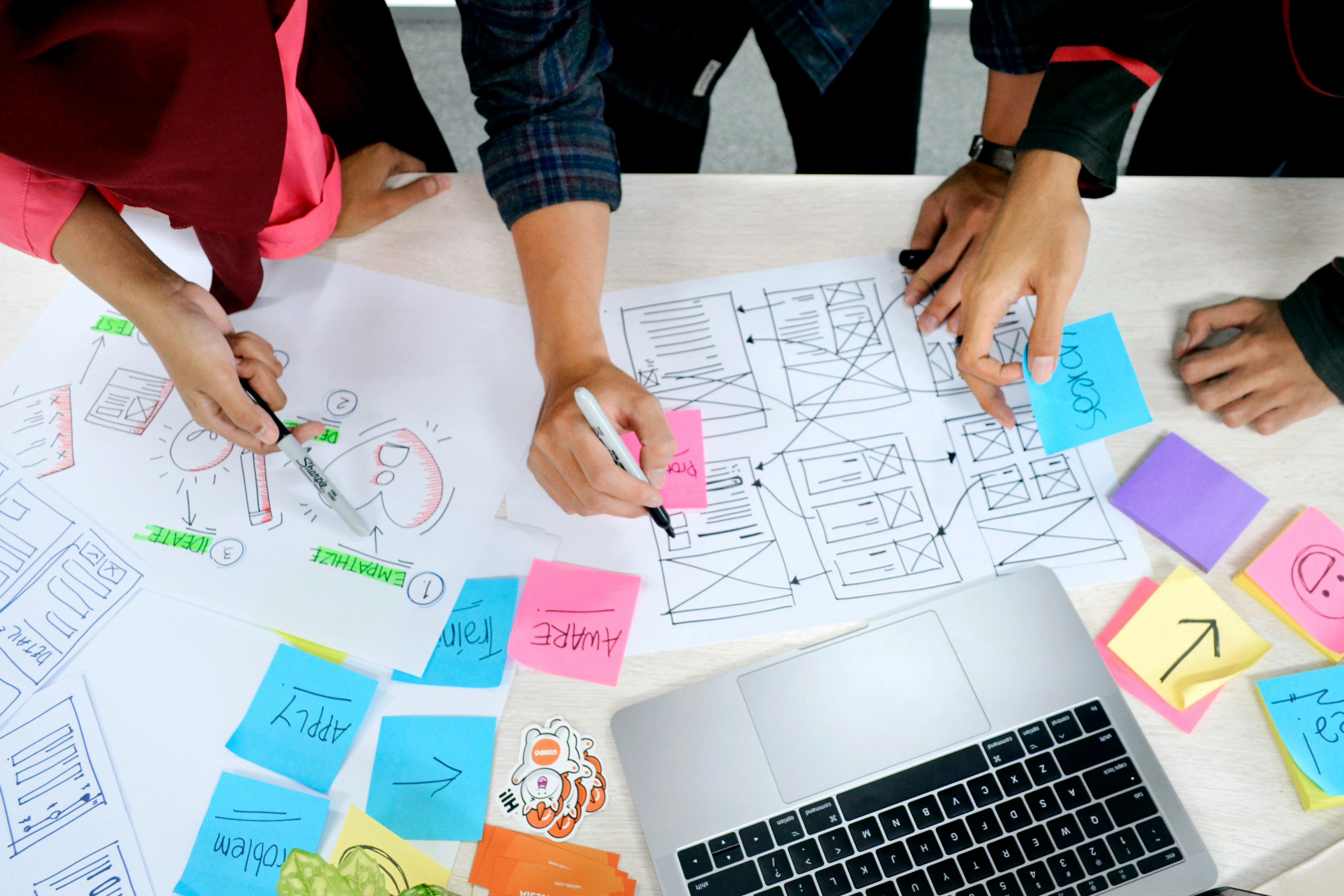
Photo by UX Indonesia on Unsplash.
What Exactly Are Server Driven UIs?
A large percentage of software applications (specifically mobile) today require some graphical user interface with which end consumers interact with the application. The experience each user has (usually referred to as UX—User Experience) while interacting with the application in their respective geographical locations determines whether they will be satisfied. This involves all mundane and complex tasks, like how fast specific data is rendered to the user upon a button click or screen swipe, to how quickly they get feedback from the application when they make manual requests by entering some text in an input field. This phenomenon makes it essential for engineering teams to invest in delivering the perfect user experience. If your software product falls under categories like ecommerce or payment services, where every interaction impacts revenue, it gets even more complex. As is commonly said in ecommerce industry, “failure to satisfy users will result in unhappy consumers, influencing conversions, sales, and revenue”—the trio that business owners hate to be affected. This philosophy drives the technological advancements in the ecommerce industry, leading to the rise and wide adoption of concepts like headless, composable commerce, and edge computing. This same philosophy drives the evolution of server-driven UIs, but for a slightly different challenge, which we will discuss soon.
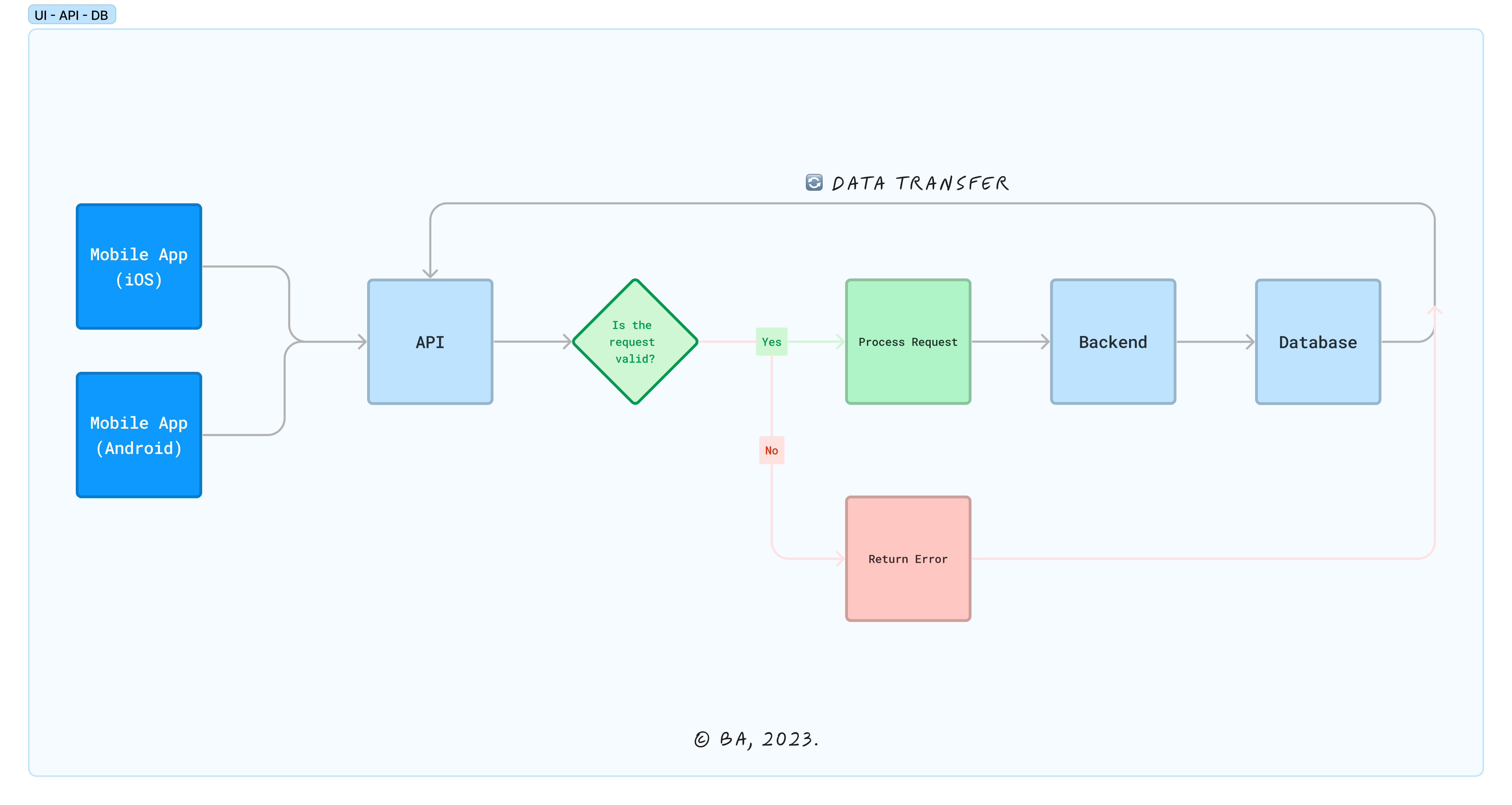
While the resulting experience of rendering data "seems easy" from the user's perspective, it is usually a lot of work for engineering teams at companies that render data to billions of users every second of the day. This involves a coordinated and distributed amount of work on both the client-side (frontend) and server-side (backend) as summarized in the illustration below.
Non-Server Driven UIs
To explain server-driven UIs, let’s first talk about what the architecture looks like without server-driven UIs. A typical application over the HTTP protocol follows a client-server architecture, where data is exchanged between the frontend (client) and the backend (server) via an application programming interface (API). Based on the query requests, the backend retrieves and inserts data into the database and returns the results to the frontend. The frontend then receives the data from the backend in a structured schema and determines where and how to render it to the user interface, based on the UX goals for each UI view (feature). This is how most classic applications function, and it is the common practice today.
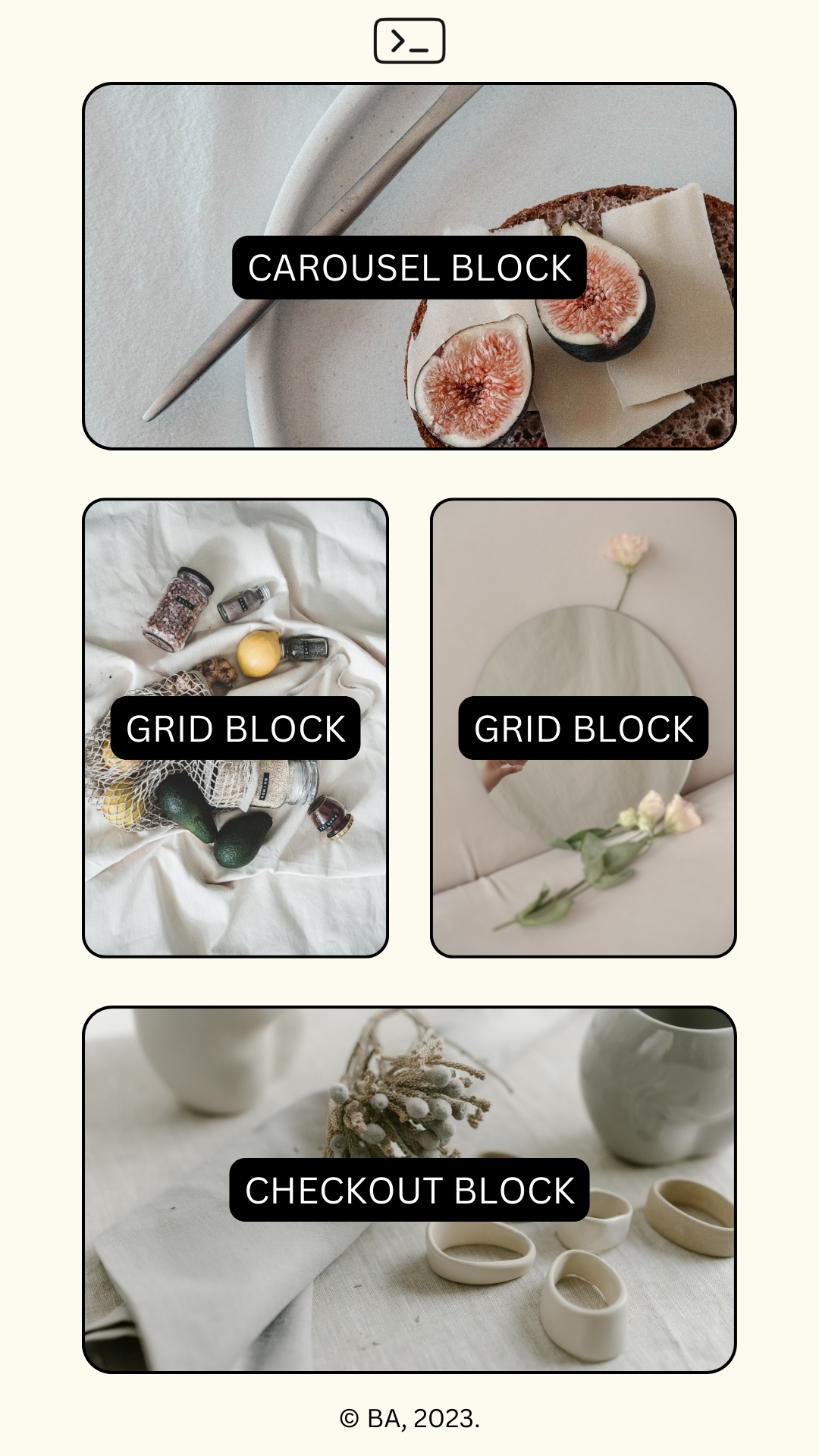
Let’s consider a hypothetical MVP ecommerce mobile application that returns the UI components on the home view screen for listing different types of products as described in the list and image below. Each product listing section returns a different type of design and styling for the product(s).
Carousel block: for highlighting top products (either based on demand or sales data).
Grid block: for in-season products (e.g., Christmas, Winter, Summer, etc.).
Checkout block: quick checkout for a randomly selected discounted product (promotions).
The query will look something like this:
query homePage {
    brand {
        title
		logo
	}
    products (country: US) {
        id
		name
		description
		slug
		price
		currency
		isTop
		isDiscounted
	    seasonTypes {
            name
            description
        }
    }
}
And the returned JSON data will look like this:
{
  "data": {
    "brand": {
			"title": "Welcome to Tailcall Shop!",
			"logo": "<https://avatars.githubusercontent.com/u/112062857>"
		},
    "products": [
      {
        "id": "1",
        "name": "Product A",
        "description": "This is a description for Product A.",
        "slug": "product-a",
        "price": 29.99,
        "currency": "USD",
        "isTop": true,
        "isDiscounted": false,
        "seasonTypes": [
          {
            "name": "Spring",
            "description": "Fresh arrivals for the spring season"
          },
          {
            "name": "Winter",
            "description": "Stay warm with our winter collection"
          },
          {
            "name": "All Seasons",
            "description": "Suitable for all seasons"
          }
        ]
      },
      {
        "id": "2",
        "name": "Product B",
        "description": "Description for Product B.",
        "slug": "product-b",
        "price": 39.99,
        "currency": "USD",
        "isTop": false,
        "isDiscounted": true,
        "seasonTypes": [
          {
            "name": "Christmas",
            "description": "Cool christmas picks"
          },
          {
            "name": "All Seasons",
            "description": "Versatile for all seasons"
          }
        ]
      },
      {
        "id": "3",
        "name": "Product C",
        "description": "Introducing Product C with a unique description.",
        "slug": "product-c",
        "price": 49.99,
        "currency": "USD",
        "isTop": true,
        "isDiscounted": true
      }
    ]
  }
}
When the frontend receives this JSON data, it’s responsible for consuming the data and rendering it to the user interface. Depending on the sequence of the returned data, the frontend renders the data in the different category blocks from top to bottom using different pre-defined UI components and logic. In addition, based on which seasonTypes the product is associated with, the frontend logic will also sort the product displayed in the Grid Block (knowing that in a real scenario, the number of products could be up to Infinity theoretically).
Now, if you want to reorder the sequence of the category blocks or add new category blocks (which will require adding new UI components), you will need to make some changes to the UI logic (code) on the client-side. This sounds good and should be easily achievable. However, since this is a cross-platform mobile application, code updates will not get to the end user immediately, just like web apps work, where you can deploy a new release and use different rendering strategies to update the entire web application upon a new user request. Each user’s device hosts the software code of the mobile application. Also, the latest version of the app needs to be submitted to the app store (most often both Android and iOS), and after a successful review and approval, the user must update the application manually if they don’t have “auto-update” turned on. There will be many repeated processes when you need to make more changes over time! Plus, users often don’t update their applications immediately after you ship a new version, which makes them lose out on new features, and you lose out on testing feedback. In addition, there might be compatibility issues with breaking changes, where the latest code state no longer matches the previous client. All of these signal the need for a different approach; ergo, server-driven UIs.
Server Driven UIs
In this case, and for the same query described above, the returned JSON data will look like this:
{
  "data": {
    "brand": {
			"title": "Welcome to Tailcall Shop!",
			"logo": "<https://avatars.githubusercontent.com/u/112062857>"
		},
    "products": [
      {
		"componentType": "gridBlock",
        "id": "1",
        "name": "Product A",
        "description": "This is a description for Product A.",
        "slug": "product-a",
        "price": 29.99,
        "currency": "USD",
        "isDiscounted": false,
        "seasonTypes": [
          {
            "name": "Spring",
            "description": "Fresh arrivals for the spring season"
          },
          {
            "name": "Winter",
            "description": "Stay warm with our winter collection"
          },
          {
            "name": "All Seasons",
            "description": "Suitable for all seasons"
          }
        ]
      },
      {
		"componentType": "carouselBlock",
        "id": "2",
        "name": "Product B",
        "description": "Description for Product B.",
        "slug": "product-b",
        "price": 39.99,
        "currency": "USD",
        "isDiscounted": true,
        "seasonTypes": [
          {
            "name": "Christmas",
            "description": "Cool christmas picks"
          },
          {
            "name": "All Seasons",
            "description": "Versatile for all seasons"
          }
        ]
      },
      {
	    "componentType": "checkoutBlock",
        "id": "3",
        "name": "Product C",
        "description": "Introducing Product C with a unique description.",
        "slug": "product-c",
        "price": 49.99,
        "currency": "USD",
        "isDiscounted": true
      }
    ]
  }
}
The UI will now read and render the data (the UI Schema) without further processing or delegation. The supplied JSON data already stipulates how and where to present each product data to the UI using the componentType property. The backend now includes UI components for the screen alongside the product information (UI components' layout view, appearance shape, content, etc.), and the client already has the agnostic templating logic to add styling to the displayed visuals. In the above MVP example, product A will be rendered first in the Grid Block, followed by product B in the Carousel Block, as shown in the image below.
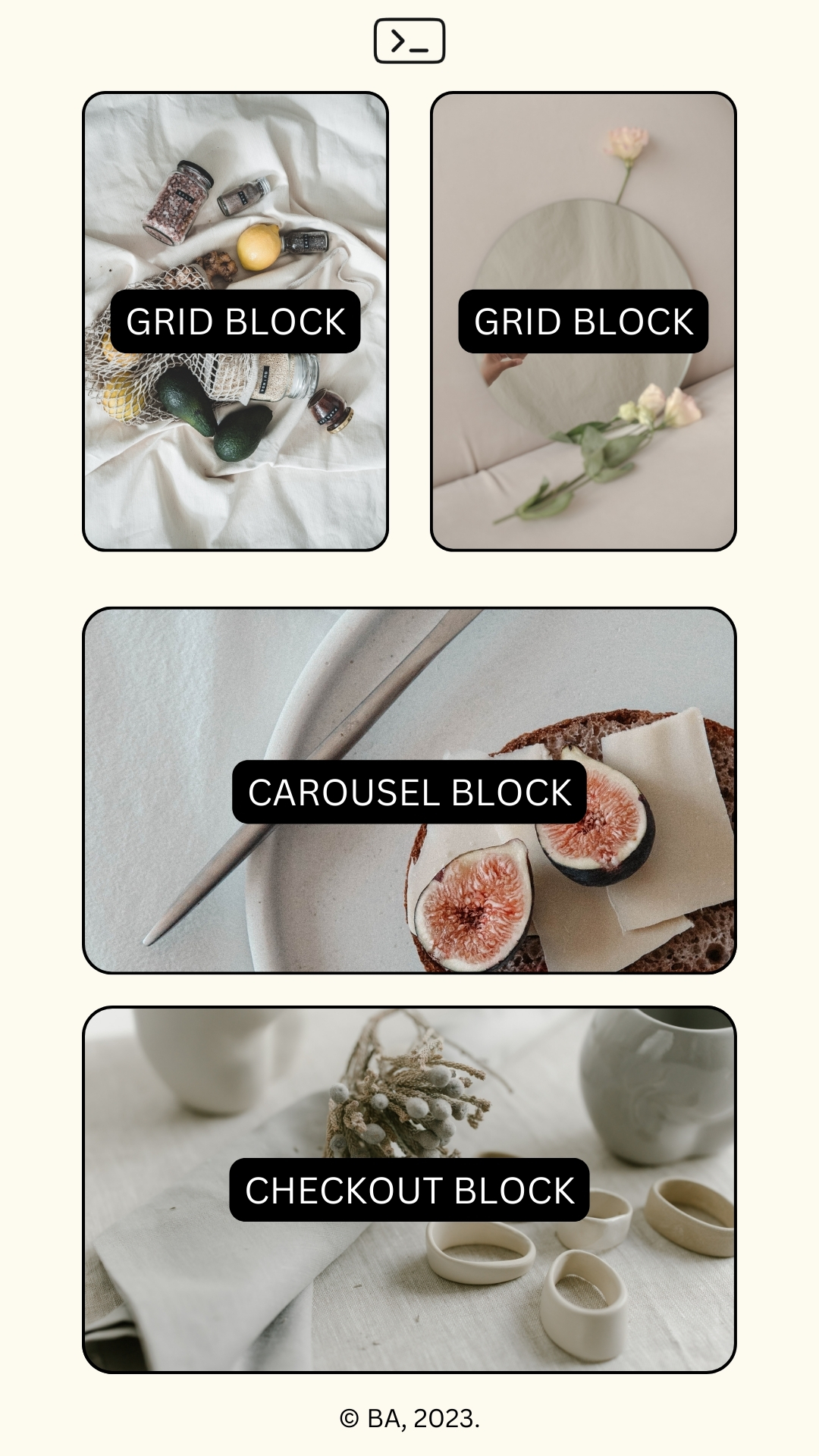
The server is now facilitating the UI change. It simultaneously updates the JSON structure and UI with no additional UI logic change and app re-deployment. This approach reduces the client-side logic and leads to consistency and better versioning across all client platforms (including web, iOS, Android, etc.). This architecture becomes super helpful when the UI of your application should change multiple times based on different types of users (e.g., an ecommerce app for multiple merchants where you need to customise the UI differently for each user). You can experiment and iterate faster without doing an entire release cycle.
Some Case Studies
Although the MVP example described earlier is hypothetical, many notable companies, including Reddit, Shopify, Airbnb, Meta, Persona, and Lyft, already use this architecture. For example, Reddit revamped its feed architecture across Android and iOS some months ago. According to an iOS engineer at Reddit, the implementation of the previous feed presented several challenges (~source):
“Last year our feeds were pretty slow. You’d start up the app, and you’d have to wait too long before getting content to show up on your screen. Equally as bad for us, internally, our feeds code had grown into something of a maintenance nightmare. The current codebase was started around 2017 when the company was considerably smaller than it is today. Many engineers and features have passed through the 6-year-old codebase with minimal architectural oversight. Increasingly, it’s been a challenge for us to iterate quickly as we try new product features in this space.”
The resulting implementation featured each post unit, represented by a generic Group object with an array of Cell objects, as seen in the image below. With this, they describe anything the Feeds screen shows as a Group (e.g., the Announcement Card or the Trending Carousel).
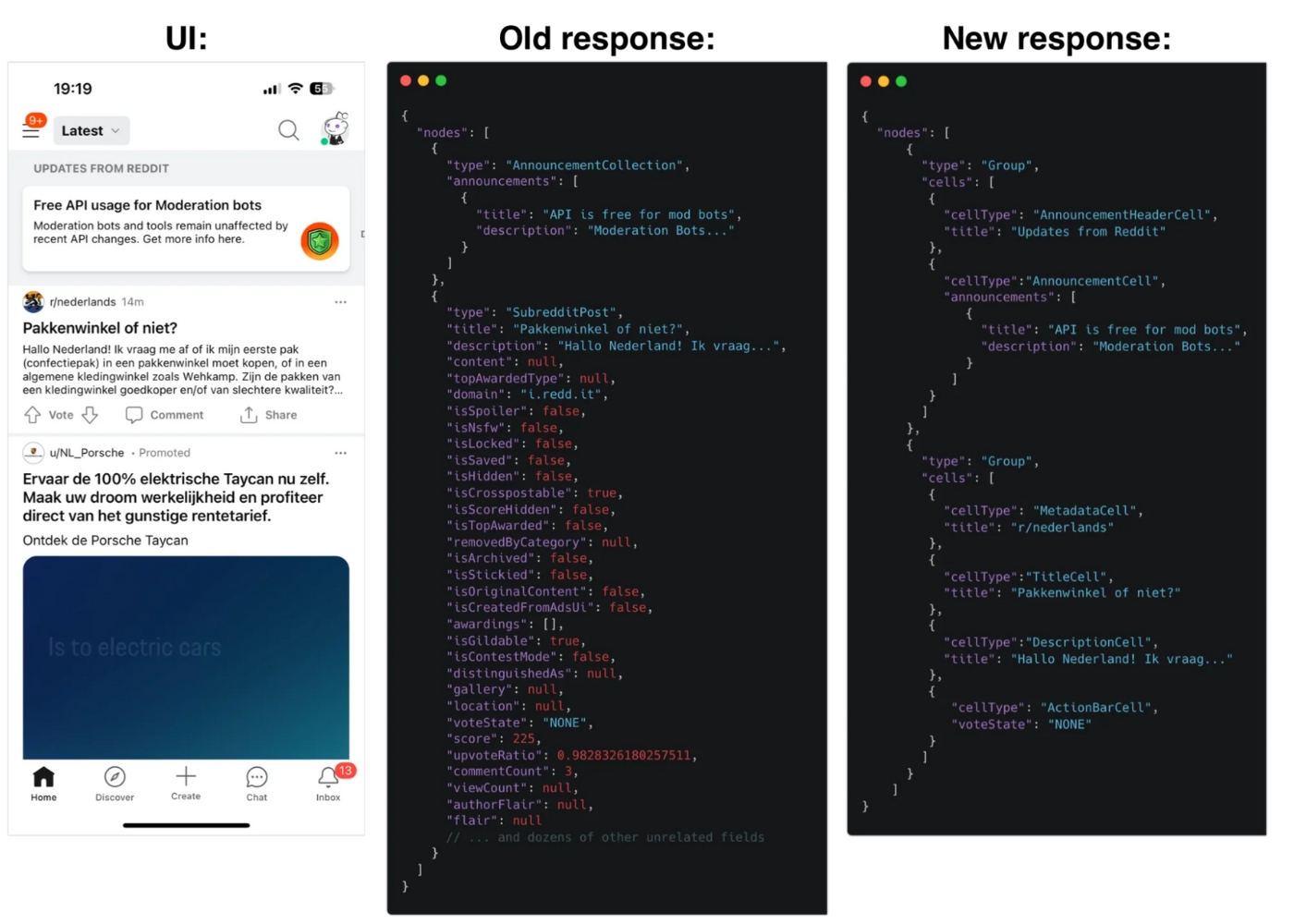
Example Schema and UI of Reddit Feeds for their Announcement Items (Source: Reddit Engineering Blog).
Another Android Engineer at Airbnb mentions similar challenges (~source):
“To show our users a listing, we might request listing data from the backend. Upon receiving this listing data, the client transforms that data into UI. This comes with a few issues. First, there’s listing-specific logic built on each client [referring to web, Android, and iOS] to transform and render the listing data. This logic becomes complicated quickly and is inflexible if we make changes to how listings are displayed down the road. Second, each client has to maintain parity with each other. As mentioned, the logic for this screen gets complicated quickly and each client has their own intricacies and specific implementations for handling state, displaying UI, etc. It’s easy for clients to quickly diverge from one another. Finally, mobile has a versioning problem.”
The resulting implementation features the backend returning the UI types the data should be rendered with, as seen in the image below. With this, they describe anything the Product Listing screen shows as a Section (e.g., the Title Section or the Home Details Section).
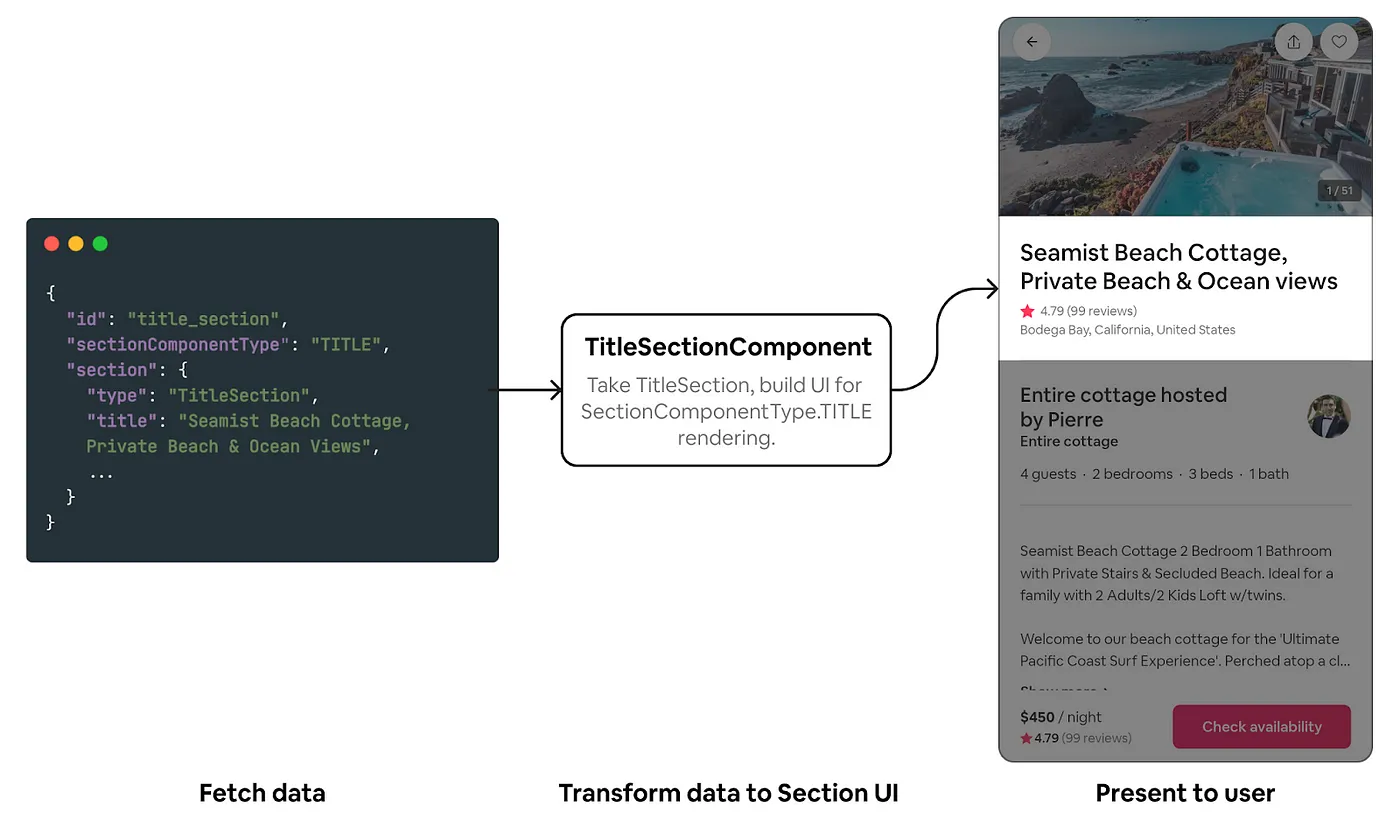
Example Schema and UI of Airbnb’s Property Overview (Source: The Airbnb Tech Blog).
Both implementations demonstrate the concept of delegating UI rendering and logic decisions to the server, with the client just rendering visuals.
Benefits of Server Driven UIs
Think about content for a minute; it's easy to ensure mutability for content-intensive applications by leveraging a headless content management system (CMS). You will develop the application to accept dynamic data from a content API and ship it to the user's devices. Multiple content managers can then collaboratively create and modify structured data stored in some repository on the cloud. The content API is updated frequently, and the application returns the new data. I previously wrote about this concept, and you can read more about it. This process is similar to server-driven UIs, but instead of just returning real-time data, the server returns real-time UI component sequences and arrangements. I was talking with a friend who expressed their engineering team's concerns about shipping their enterprise software on a point-of-sale (POS) payments machine, which will power different payment providers (see them like merchants for the end users—the hardware owners). A consumer will purchase each machine with the pre-installed software, which can be updated later, though tedious (especially for less digitally savvy users). Updating the software each time they want to add new UI logic for the newly added providers (merchants) on the hardware is even more complex than typical smartphones, making it a good case for Server-Driven UIs. If implemented successfully, they can ship the hardware with the first version of the software and incrementally update the software’s UI logic from the server as they deem fit.
In summary, some benefits of Server Driven UIs include:
Better Versioning: There won't be a need for multiple releases for UI logic changes.
Reduced Bundle Size: Since no code is added to the frontend logic when the developers need to make UI customisation changes, the app size remains lightweight as shipped. This is essential for software shipped on low-end devices with limited computing power.
Faster Experimentation and Iteration: Now, engineering teams can experiment with and test new ideas (whether driven by creativity, UX research, or user feedback) faster across all supported platforms without releasing new versions.
Efficient A/B Testing: Due to the advantages described above, engineering teams can now compare two versions of the UI logic to determine which performs better and faster than they would without SDUI. Now, the dataset would be more extensive since all inactive and active users with the application installed will receive the updates.
Personalised User Experiences: It becomes easier to adjust the UI rendering based on user demands, user behaviour, preferences, or results from the A/B testing phases.
Easier Migration: It's easier to adopt new frontend frameworks because there's less business logic in them. With the UI shape returned from the server, you can experiment and innovate on the frontend much faster with minimal business impact.
Companies that require both native mobile and web application development may benefit the most from SDUI. This can be software running on a smartphone or an embedded system (Arduino, Raspberry Pi, point-of-sale payment machines, etc.). Generally, server-side UIs can be applied in the following software industries:
Social Media: dynamically update feeds and notifications across different devices.
Ecommerce Applications: dynamically update product listings, promotions, and user interfaces without requiring users to update their applications.
Content Management Systems (CMS): dynamically manage and deliver content to different clients, ensuring a consistent user experience across web and mobile interfaces.
Multiplayer Gaming Applications: dynamically update game interfaces, dashboards, leaderboards, and in-game feeds and notifications.
Enterprise Software: dynamically manage and update dashboards, reports, and other UI components used by customers and consumers across different devices.
Real-Time Collaboration Tools: synchronise changes and maintain a consistent user interface for messaging or collaborative document editing software.
Medical Applications: dynamically update patient records, appointment schedules, transactions, and other relevant information for medical professionals in real-time.
Internet of Things (IoT): dynamically control and update the user interfaces of software running on embedded systems.
Et cetera.
Various factors, including the necessity for dynamic changes, platform consistency, and the application's nature, determine the suitability of server-driven UIs. While not suitable for all scenarios, server-driven UIs provide advantages in certain situations.
Using GraphQL to Build Server Driven UIs
SDUI is a software design pattern you can implement in various ways, including with GraphQL. GraphQL is more suited for something like this compared to its counterpart since it's a query language that offers a better development experience. With a single query to the GraphQL server, you can get multiple UI components (product information, in our case) without multiple API round-trips. Facebook started using GraphQL in 2012 for their native mobile applications, even before announcing it at the React.js Conference in 2015. Although GraphQL seems more known for web applications recently, Facebook's use since its inception shows that the technology is well-suited for mobile application development.
Your schema and design must correlate when building a GraphQL server using the server-driven UI approach. The backend must leverage the existing UI component schemas to build the new view components or screen structure. The frontend UI should update if the server introduces a new design component or structural adjustment. This approach will require focusing on:
A well-defined UI design system and collection of components (UI elements).
A template processing layer that will receive and process customisation requests.
A well-defined GraphQL Schema.
Other required orchestration layers.
Whatever method you choose to implement SDUI with GraphQL, you should observe the following fundamental principles:
Start with UI design. Create a design system using patterns like Atomic Design and follow the demand-oriented schema approach.
Return product information as UI elements (presentation information on UI components' layout view, appearance, content, etc.) and not domain data (core business logic).
Implement the design and API using GraphQL types. You can follow Apollo's recommended approach to schema design, which includes common strategies and best practices.
Avoid including styling values (like font size, colours, etc.) in the server. UI component styling should be pre-built on the client to meet the server's requirements.
Adopt SDUI incrementally if your product is already in production. Start with minor features, reduce business logic in the existing client code, gather feedback, and slowly work your way up.
The schema of our hypothetical MVP described earlier will look like this without a server-driven UI approach in use:
type Brand {
	title: String;
	logo: Image;
}

type SeasonTypes {
	name: String;
	description: String;
    count: Int;
}

type Product @key(fields: "country") {
    componentType: String;
    id: String;
    name: String
    description: String;
    slug: String;
    price: String;
    currency: String;
	isTop: Boolean;
	isDiscounted: Boolean;
	seasonTypes?: [SeasonTypes];
    count: Int;
}
If we then switch to server-driven UIs, we will have something like this:
type Brand {
	title: String;
	logo: Image;
}

type SeasonTypes {
	name: String;
	description: String;
    count: Int;
}

type Product @key(fields: "country") {
  componentType: String;
  id: String;
  name: String
  description: String;
  slug: String;
  price: String;
  currency: String;
  isTop: Boolean;
  isDiscounted: Boolean;
  seasonTypes?: [SeasonTypes];
  count: Int;
}

# ...

type BlockCarousel {
	elements: [...];
	product: [Product];
}

type BlockGrid {
	elements: [...];
	product: [Product];
}

type BlockCheckout {
	elements: [...];
	product: [Product];
}

ProductViews = BlockCarousel | CarouselGrid | CheckoutGrid;

type HomeScreen {
	blocks: ProductViews;
}
A client-side query for HomeScreen.blocks will return all the product data and different product listing views. The client can then render multiple specific experiences depending on the query result (user’s customisation request). This is a quick pseudocode overview of how implementing Server-Driven UI will look in GraphQL. For further learning, you can check out this project on GitHub, which you can use as a resource or playground to learn SDUI. It covers an end-to-end implementation of how SDUI works and follows the SDUI paradigm by ensuring the clients reference the same data endpoint that provides the UI schematics on how the client should render it. It includes a graphql-server, template-server, style-tokens, web-app, and mobile-app modules alongside extensive documentation that you can read.
Conclusion
Server-Driven User Interfaces (SDUIs) provide a dynamic, efficient, and adaptable solution to maintaining and updating the user interfaces of mobile apps. By transferring UI rendering operations from the client to the server, updates and modifications can be implemented fast without requiring users to download a new version of the app. This method results in a more seamless developer experience and a customizable user experience.
You should also note that SDUI is an expensive undertaking that requires significant engineering effort, especially if you have to migrate from an existing architecture. It comes with downsides (like the application becoming more online-first-focused and some offline capabilities needing to be reworked). However, there are benefits if your use case fits it so well that the business value of the upsides outweighs the downsides. As with any technology, evaluating your requirements and understanding the benefits and potential challenges is crucial before implementing server-driven UIs in your application. Hopefully, this article has been insightful, and you can take it further and do advanced research and experimentation.
Thanks for reading this far; cheers! 💙
About the author
undefined or mostly null.
Comments
Join the discussionNo comments yet. Be the first to comment.
Web Engineering
In this series, I will share articles related to best practices for building and deploying applications on the web with the JavaScript and Python programming languages.