Arrays have become an important part of any programming language. In this article, I would show you various methods of manipulating arrays in JavaScript [^^]
What are Arrays in JavaScript?
Before we proceed, you need to understand what arrays really mean.
In JavaScript, an array is a variable that is used to store different data types. It basically stores different elements in one box and can be later assesssed with the variable.
Declaring an array:
let myBox = []; // Initial Array declaration in JS
Arrays can contain multiple data types
let myBox = ['hello', 1, 2, 3, true, 'hi'];
Arrays can be manipulated by using several actions known as methods. Some of these methods allow us to add, remove, modify and do lots more to arrays.
I would be showing you a few in this article, let’s roll :)
NB: I used Arrow functions in this article, If you don’t know what this means, you should read this.
toString()
The JavaScript method toString() converts an array to a string separated by a
comma.
let colors = ['green', 'yellow', 'blue']; colors.toString();
console.log(colors); // "green,yellow,blue"
join()
The JavaScript join() method combines all array elements into a string.
It is similar to toString() method, but here you can specify the separator
instead of the default comma.
let colors = ['green', 'yellow', 'blue']; colors.join('-');
console.log(colors); // "green-yellow-blue"
concat
This method combines two arrays together or add more items to an array and then return a new array.
let firstNumbers = [1, 2, 3]; let secondNumbers = [4, 5, 6];
let merged = firstNumbers.concat(secondNumbers);
console.log(merged); // [1, 2, 3, 4, 5, 6]
push()
This method adds items to the end of an array and changes the original array.
let browsers = ['chrome', 'firefox', 'edge']; browsers.push('safari', 'opera mini');
console.log(browsers); // ["chrome", "firefox", "edge", "safari", "opera mini"]
pop()
This method removes the last item of an array and returns it
let browsers = ['chrome', 'firefox', 'edge']; browsers.pop(); // "edge"
console.log(browsers); // ["chrome", "firefox"]
shift()
This method removes the first item of an array and returns it
let browsers = ['chrome', 'firefox', 'edge']; browsers.shift(); // "chrome"
console.log(browsers); // ["firefox", "edge"]
unshift()
This method adds an item(s) to the beginning of an array and changes the original array.
let browsers = ['chrome', 'firefox', 'edge']; browsers.unshift('safari');
console.log(browsers); // ["safari", "chrome", "firefox", "edge"]
You can also add multiple items at once
splice()
This method changes an array, by adding, removing and inserting elements.
The syntax is:
array.splice(index[, deleteCount, element1, ..., elementN])
Indexhere is the starting point for removing elements in the arraydeleteCountis the number of elements to be deleted from that indexelement1, …, elementNis the element(s) to be added
Removing items
after running splice(), it returns the array with the item(s) removed and removes it from the original array.
let colors = ['green', 'yellow', 'blue', 'purple']; colors.splice(0, 3); console.log(colors); // ["purple"] // deletes ["green", "yellow", "blue"]
NB: The deleteCount does not include the last index in range.
If the second parameter is not declared, every element starting from the given index will be removed from the array:
let colors = ['green', 'yellow', 'blue', 'purple']; colors.splice(3); console.log(colors); // ["green", "yellow", "blue"] // deletes ['purple']
In the next example we will remove 3 elements from the array and replace them with more items:
let schedule = ['I', 'have', 'a', 'meeting', 'tommorrow'];
// removes 4 first elements and replace them with another
schedule.splice(0, 4, 'we', 'are', 'going', 'to', 'swim');
console.log(schedule);
// ["we", "are", "going", "to", "swim", "tommorrow"]
Adding items
To add items, we need to set the deleteCount to zero
let schedule = ['I', 'have', 'a', 'meeting', 'with'];
// adds 3 new elements to the array
schedule.splice(5, 0, 'some', 'clients', 'tommorrow');
console.log(schedule);
// ["I", "have", "a", "meeting", "with", "some", "clients", "tommorrow"]
slice()
This method is similar to
splice()but very different. It returns subarrays instead of substrings.
This method copies a given part of an array and returns that copied part as a new array. It does not change the original array.
The syntax is:
array.slice(start, end)
Here’s a basic example:
let numbers = [1, 2, 3, 4] numbers.slice(0, 3) // returns [1, 2, 3]
console.log(numbers) // returns the original array
The best way to use slice() is to assign it to a new variable.
let message = 'congratulations' const abbrv = message.slice(0, 7) + 's!'; console.log(abbrv) // returns "congrats!"
split()
This method is used for strings. It divides a string into substrings and returns them as an array.
Here’s the syntax:
string.split(separator, limit);
- The
separatorhere defines how to split a string either by a comma. - The
limitdetermines the number of splits to be carried out
let firstName = 'Bolaji';
// return the string as an array
firstName.split() // ["Bolaji"]
another example:
let firstName = 'hello, my name is bolaji, I am a dev.'; firstName.split(',', 2); // ["hello", " my name is bolaji"]
NB: If we declare an empty array, like this:
firstName.split('');then each item in the string will be divided as substrings:
let firstName = 'Bolaji'; firstName.split('') // ["B", "o", "l", "a", "j", "i"]
indexOf()
This method looks for an item in an array and returns the index where it was
found else it returns -1
let fruits = ['apple', 'orange', false, 3] fruits.indexOf('orange'); // returns 1 fruits.indexOf(3); // returns 3 friuts.indexOf(null); // returns -1 (not found)
lastIndexOf()
This method works the same way indexOf() does except that it works from right to left. It returns the last index where the item was found
let fruits = ['apple', 'orange', false, 3, 'apple'] fruits.lastIndexOf('apple'); // returns 4
filter()
This method creates a new array if the items of an array pass a certain condition.
The syntax is:
let results = array.filter(function(item, index, array) {
  // returns true if the item passes the filter
});
Example:
Checks users from Nigeria
const countryCode = ['+234', '+144', '+233', '+234'];
const nigerian = countryCode.filter( code => code === '+234');
console.log(nigerian); // ["+234", "+234"]
map()
This method creates a new array by manipulating the values in an array.
Example:
Displays usernames on a page. (Basic friend list display)
const userNames = ['tina', 'danny', 'mark', 'bolaji']; const display = userNames.map(item => { '
- ' + display.join('') + '
document.write(render);

another example:
// adds dollar sign to numbers
const numbers = [10, 3, 4, 6];
const dollars = numbers.map( number => '$' + number);
console.log(dollars);
// ['$10', '$3', '$4', '$6'];
reduce()
This method is good for calculating totals.
reduce() is used to calculate a single value based on an array.
The syntax is:
let value = array.reduce(function(previousValue, item, index, array) {
  // ...
}, initial);
example:
To loop through an array and sum all numbers in the array up, we can use the for of loop.
const numbers = [100, 300, 500, 70];
let sum = 0;
for (let n of numbers) {
sum += n;
}
console.log(sum);
Here’s how to do same with reduce()
const numbers = [100, 300, 500, 70]; const sum = numbers.reduce((accummulator, value) => accummulator + value , 0);
console.log(sum); // 970
If you omit the initial value, the total will by default start from the first item in the array.
const numbers = [100, 300, 500, 70]; const sum = numbers.reduce((accummulator, value) => accummulator + value);
console.log(sum); // still returns 970
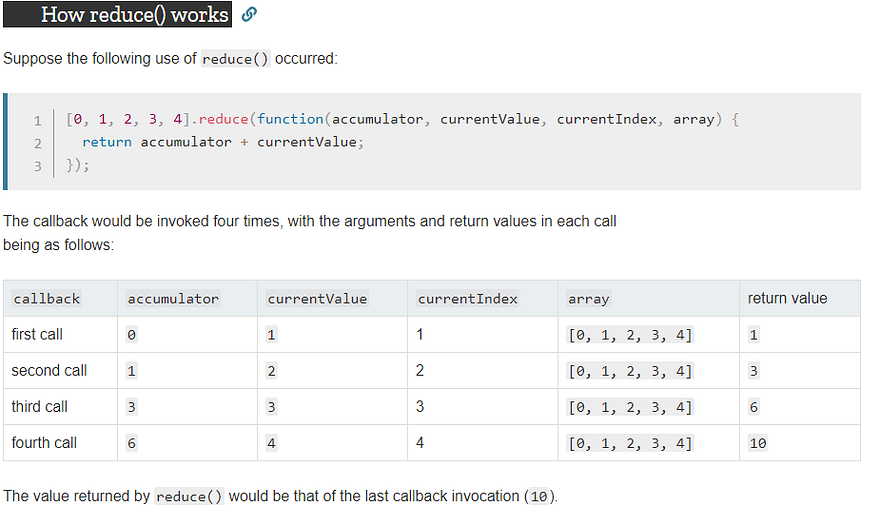
The snippet below shows how the reduce() method works with all four arguments.
source: MDN Docs
More insights into the reduce() method and various ways of using it can be found here and here.
forEach()
This method is good for iterating through an array.
It applies a function on all items in an array
const colors = ['green', 'yellow', 'blue'];
colors.forEach((item, index) => console.log(index, item)); // returns the index and the every item in the array // 0 "green" // 1 "yellow" // 2 "blue"
iteration can be done without passing the index argument
const colors = ['green', 'yellow', 'blue'];
colors.forEach((item) => console.log(item)); // returns every item in the array // "green" // "yellow" // "blue"
every()
This method checks if all items in an array pass the specified condition and
return true if passed, else false.
check if all numbers are positive
const numbers = [1, -1, 2, 3]; let allPositive = numbers.every((value) => { value >= 0; })
console.log(allPositive);
some()
This method checks if an item (one or more) in an array pass the specified condition and return true if passed, else false.
checks if at least one number is positive
const numbers = [1, -1, 2, 3];
let atLeastOnePositive = numbers.some((value) => { value >= 0; }) console.log(atLeastOnePositive);
includes()
This method checks if an array contains a certain item. It is similar to
.some(), but instead of looking for a specific condition to pass, it checks if
the array contains a specific item.
let users = ['paddy', 'zaddy', 'faddy', 'baddy']; users.includes('baddy'); // returns true
If the item is not found, it returns false
There are more array methods, this is just a few of them. Also, there are tons of other actions that can be performed on arrays, try checking MDN docs here for deeper insights.
Summary
- toString() converts an array to a string separated by a comma.
- join() combines all array elements into a string.
- concat combines two arrays together or add more items to an array and then return a new array.
- push() adds item(s) to the end of an array and changes the original array.
- pop() removes the last item of an array and returns it
- shift() removes the first item of an array and returns it
- unshift() adds an item(s) to the beginning of an array and changes the original array.
- splice() changes an array, by adding, removing and inserting elements.
- slice() copies a given part of an array and returns that copied part as a new array. It does not change the original array.
- split() divides a string into substrings and returns them as an array.
- indexOf() looks for an item in an array and returns the index where it
was found else it returns
-1 - lastIndexOf() looks for an item from right to left and returns the last index where the item was found.
- filter() creates a new array if the items of an array pass a certain condition.
- map() creates a new array by manipulating the values in an array.
- reduce() calculates a single value based on an array.
- forEach() iterates through an array, it applies a function on all items in an array
- every() checks if all items in an array pass the specified condition and return true if passed, else false.
- some() checks if an item (one or more) in an array pass the specified condition and return true if passed, else false.
- includes() checks if an array contains a certain item.
Let’s wrap it here; Arrays are powerful and using methods to manipulate them creates the Algorithms real-world applications use.
Let's do a create a small function, one that converts a post title into a urlSlug.
URL slug is the exact address of a specific page or post on your site.
When you write an article on Hashnode or any other writing platform, your post title is automatically converted to a slug with white spaces removed, characters turned to lowercase and each word in the title separated by a hyphen.
Here’s a basic function that does that using some of the methods we learnt just now.
const url = 'https://bolajiayodeji.com/'
const urlSlug = (postTitle) => {
let postUrl = postTitle.toLowerCase().split(' ');
let postSlug = `${url}` + postUrl.join('-');
return postSlug;
}
let postTitle = 'Introduction to Chrome Lighthouse'
console.log(urlSlug(postTitle));

// https://bolajiayodeji.com/introduction-to-chrome-lighthouse
in postUrl, we convert the string to lowercase then we use the split()
method to convert the string into substrings and returns it in an array
["introduction", "to", "chrome", "lighthouse"]
in post slug we join the returned array with a hyphen and then concatenate it
to the main url.
let postSlug = ${url} + postUrl.join('-');
postUrl.join('-') // introduction-to-chrome-lighthouse
That’s it, pretty simple, right? :)
If you’re just getting started with JavaScript, you should check this repository here, I’m compiling a list of basic JavaScript snippets ranging from
- Arrays
- Control flow
- Dom
- Functions
- Objects
- Operators
Thank you for reading, got any questions or views? Let's discuss in the comments.
About the author
undefined or mostly null.
Comments
Join the discussionJava script and all language content are opened for the programmers. All the tips of the java and bid4papers are implemented for the guided elements. The principle flows for the joy and approval of the parks for the field for the scripts of the java.
Lovely article Bolaji!
Thank you :+1:
Awesome article. Just what I need!
Am already Clapping bro, Great article.
Web Engineering
In this series, I will share articles related to best practices for building and deploying applications on the web with the JavaScript and Python programming languages.