This little guide demonstrates how to turn any Github repository with a bunch of Markdown files into a simple website using Github Pages and Jekyll.
- You don't need to use the command line or anything other than your browser.
- It doesn't require any knowledge in Jekyll.
- It's completely compatible with any bunch of markdown files you already have in
any existing repository without any modification to those files. That includes
the basic
README.mdalmost all repositories contain. - The markdown files will remain just as readable and usable in Github than in your website.
Step by step instructions
- Determine the repository where you want to activate GitHub Pages
You can, of course, create a new repository if you want.
- Create the
_.config.ymlfile
That file should be created on the root of your repository. Here is some content to copy-paste in it:
plugins:
  - jekyll-relative-links
relative_links:
  enabled: true
  collections: true
include:
  - CONTRIBUTING.md
  - README.md
  - LICENSE.md
  - COPYING.md
  - CODE_OF_CONDUCT.md
  - CONTRIBUTING.md
  - ISSUE_TEMPLATE.md
  - PULL_REQUEST_TEMPLATE.md
It's basically just a few tuning of GitHub Pages default configuration to have better handling of Markdown files.
- Activate GitHub Pages in your repository configuration
On the GitHub page of your project go into Settings > Options > Github Pages:
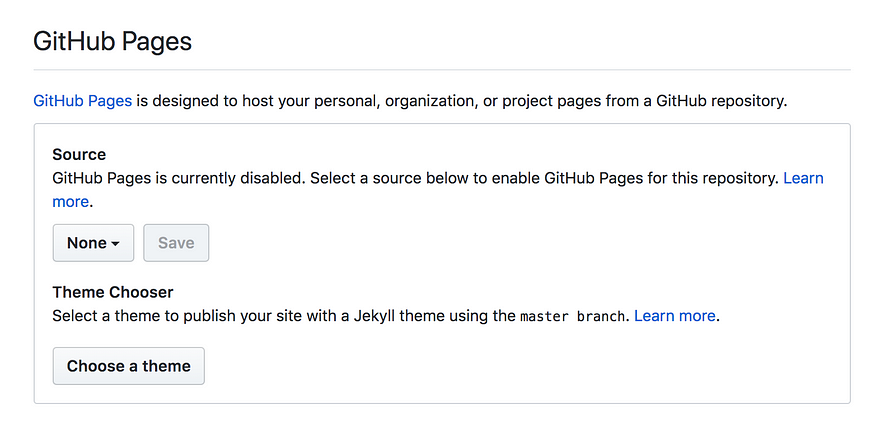
In the Source option, select master branch then Save:
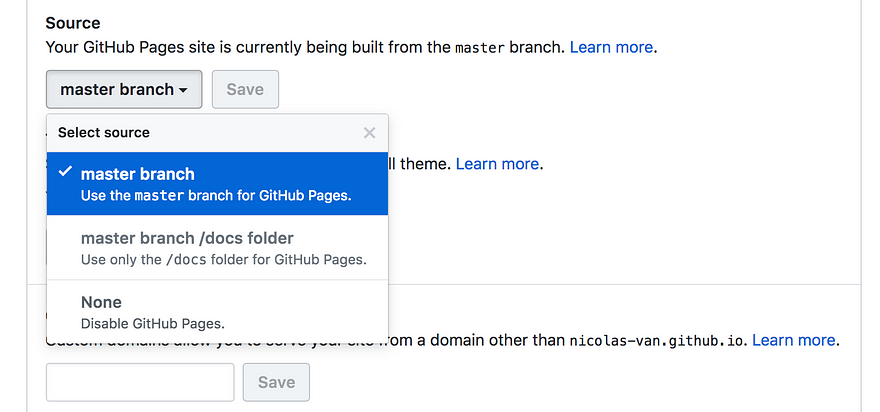
You must also choose a theme:

That's it! Now you can just use the link provided by GitHub to access you website:
Your site is published at https://bolajiayodeji.github.io/xxxxxx/
Usage guide
- Any markdown file in your repository will display in your GitHub Pages website.
You just have to use the same path to access it and replace the
.mdextension by.html.
So if you want to display your README.md file, you have to enter the URL as
README.html
- To make links between your Markdown files just use a relative path to the other
Markdown file. The configuration you copy pasted in your
_config.ymlprovides a plugin to convert those URLs.
So your Markdown files will have correct links both in GitHub and GitHub Pages.
- The index page of your website can be a
index.mdfile or aREADME.mdfile. If both exist theindex.mdfile has priority. - You should be able to use any GitHub Flavored Markdown.
Known differences between GitHub and GitHub Pages
There are no automatic links with GitHub Pages. The GitHub Markdown renderer can automatically detect a simple copy-pasted link and make it a clickable link.
GitHub Pages doesn't propose a feature to reproduce that behaviour, so you'll
have to braces your links with the []()syntax.
About the author
undefined or mostly null.
Comments
Join the discussionNo comments yet. Be the first to comment.
Open Source
In this series, I will share articles related to creating, contributing to, maintaining, and sustaining open source projects.