# Manipulating Arrays in JavaScript
Arrays have become an important part of any programming language.
In this article, I would show you various methods of manipulating arrays in
JavaScript [^^]
*****
### What are Arrays in JavaScript?
Before we proceed, you need to understand what arrays really mean.
> In JavaScript, an array is a variable that is used to store different data
> types. It basically stores different elements in one box and can be later
assesssed with the variable.
Declaring an array:
let myBox = []; // Initial Array declaration in JS
Arrays can contain multiple data types
let myBox = ['hello', 1, 2, 3, true, 'hi'];
*****
Arrays can be manipulated by using several actions known as **methods.** Some of
these methods allow us to add, remove, modify and do lots more to arrays.
I would be showing you a few in this article, let’s roll :)
> NB: I used **Arrow functions** in this article, If you don’t know what this means, you should read [this](https://developer.mozilla.org/en-US/docs/Web/JavaScript/Reference/Functions/Arrow_functions).
*****
### toString()
The JavaScript method `toString()` converts an array to a string separated by a
comma.
let colors = ['green', 'yellow', 'blue'];
colors.toString();
console.log(colors); // "green,yellow,blue"
### join()
The JavaScript `join()` method combines all array elements into a string.
It is similar to `toString()` method, but here you can specify the separator
instead of the default comma.
let colors = ['green', 'yellow', 'blue'];
colors.join('-');
console.log(colors); // "green-yellow-blue"
### concat
This method combines two arrays together or add more items to an array and then
return a new array.
let firstNumbers = [1, 2, 3];
let secondNumbers = [4, 5, 6];
let merged = firstNumbers.concat(secondNumbers);
console.log(merged); // [1, 2, 3, 4, 5, 6]
### push()
This method adds items to the end of an array and **changes** the original
array.
let browsers = ['chrome', 'firefox', 'edge'];
browsers.push('safari', 'opera mini');
console.log(browsers);
// ["chrome", "firefox", "edge", "safari", "opera mini"]
### pop()
This method removes the last item of an array and **returns** it
let browsers = ['chrome', 'firefox', 'edge'];
browsers.pop(); // "edge"
console.log(browsers); // ["chrome", "firefox"]
### shift()
This method removes the first item of an array and **returns** it
let browsers = ['chrome', 'firefox', 'edge'];
browsers.shift(); // "chrome"
console.log(browsers); // ["firefox", "edge"]
### unshift()
This method adds an item(s) to the beginning of an array and **changes** the
original array.
let browsers = ['chrome', 'firefox', 'edge'];
browsers.unshift('safari');
console.log(browsers); // ["safari", "chrome", "firefox", "edge"]
> You can also add multiple items at once
### splice()
This method **changes** an array, by adding, removing and inserting
elements.
The syntax is:
```
array.splice(index[, deleteCount, element1, ..., elementN])
```
* `Index` here is the starting point for removing elements in the array
* `deleteCount` is the number of elements to be deleted from that index
* `element1, …, elementN` is the element(s) to be added
**Removing items**
> after running **splice()**, it returns the array with the item(s) removed and
> removes it from the original array.
let colors = ['green', 'yellow', 'blue', 'purple'];
colors.splice(0, 3);
console.log(colors); // ["purple"]
// deletes ["green", "yellow", "blue"]
> **NB**: The deleteCount does not include the last index in range.
If the second parameter is not declared, every element starting from the given
index will be removed from the array:
let colors = ['green', 'yellow', 'blue', 'purple'];
colors.splice(3);
console.log(colors); // ["green", "yellow", "blue"]
// deletes ['purple']
In the next example we will remove 3 elements from the array and replace them
with more items:
```
let schedule = ['I', 'have', 'a', 'meeting', 'tommorrow'];
// removes 4 first elements and replace them with another
schedule.splice(0, 4, 'we', 'are', 'going', 'to', 'swim');
console.log(schedule);
// ["we", "are", "going", "to", "swim", "tommorrow"]
```
**Adding items**
To add items, we need to set the `deleteCount` to zero
```
let schedule = ['I', 'have', 'a', 'meeting', 'with'];
// adds 3 new elements to the array
schedule.splice(5, 0, 'some', 'clients', 'tommorrow');
console.log(schedule);
// ["I", "have", "a", "meeting", "with", "some", "clients", "tommorrow"]
```
### slice()
> This method is similar to `splice()` but very different. It returns subarrays
> instead of substrings.
This method **copies** a given part of an array and returns that copied part as
a new array. **It does not change the original array.**
The syntax is:
```
array.slice(start, end)
```
Here’s a basic example:
let numbers = [1, 2, 3, 4]
numbers.slice(0, 3)
// returns [1, 2, 3]
console.log(numbers) // returns the original array
The best way to use `slice()` is to assign it to a new variable.
let message = 'congratulations'
const abbrv = message.slice(0, 7) + 's!';
console.log(abbrv) // returns "congrats!"
### split()
This method is used for **strings**. It divides a string into substrings and
returns them as an array.
Here’s the syntax:
string.split(separator, limit);
* The `separator` here defines how to split a string either by a comma.
* The `limit` determines the number of splits to be carried out
```
let firstName = 'Bolaji';
// return the string as an array
firstName.split() // ["Bolaji"]
```
another example:
let firstName = 'hello, my name is bolaji, I am a dev.';
firstName.split(',', 2); // ["hello", " my name is bolaji"]
> **NB:** If we declare an empty array, like this: *`firstName.split('');`* then
> each item in the string will be divided as substrings:
let firstName = 'Bolaji';
firstName.split('') // ["B", "o", "l", "a", "j", "i"]
### indexOf()
This method looks for an item in an array and returns **the index** where it was
found else it returns `-1`
let fruits = ['apple', 'orange', false, 3]
fruits.indexOf('orange'); // returns 1
fruits.indexOf(3); // returns 3
friuts.indexOf(null); // returns -1 (not found)
### lastIndexOf()
This method works the same way **indexOf()** does except that it works from
right to left. It returns the last index where the item was found
let fruits = ['apple', 'orange', false, 3, 'apple']
fruits.lastIndexOf('apple'); // returns 4
### filter()
This method creates a new array if the items of an array pass a certain
condition.
The syntax is:
```
let results = array.filter(function(item, index, array) {
// returns true if the item passes the filter
});
```
Example:
Checks users from Nigeria
```
const countryCode = ['+234', '+144', '+233', '+234'];
const nigerian = countryCode.filter( code => code === '+234');
console.log(nigerian); // ["+234", "+234"]
```
### map()
This method creates a new array by manipulating the values in an array.
Example:
Displays usernames on a page. (Basic friend list display)
const userNames = ['tina', 'danny', 'mark', 'bolaji'];
const display = userNames.map(item => {
'' + item + '';
})
const render = '';
document.write(render);

another example:
```
// adds dollar sign to numbers
const numbers = [10, 3, 4, 6];
const dollars = numbers.map( number => '$' + number);
console.log(dollars);
// ['$10', '$3', '$4', '$6'];
```
### reduce()
This method is good for calculating totals.
**reduce()** is used to calculate a single value based on an array.
The syntax is:
```
let value = array.reduce(function(previousValue, item, index, array) {
// ...
}, initial);
```
example:
> To loop through an array and sum all numbers in the array up, we can use the for
> of loop.
```
const numbers = [100, 300, 500, 70];
let sum = 0;
for (let n of numbers) {
sum += n;
}
console.log(sum);
```
Here’s how to do same with `reduce()`
const numbers = [100, 300, 500, 70];
const sum = numbers.reduce((accummulator, value) =>
accummulator + value
, 0);
console.log(sum); // 970
> If you omit the initial value, the *total* will by default start from the first
> item in the array.
const numbers = [100, 300, 500, 70];
const sum = numbers.reduce((accummulator, value) => accummulator + value);
console.log(sum); // still returns 970
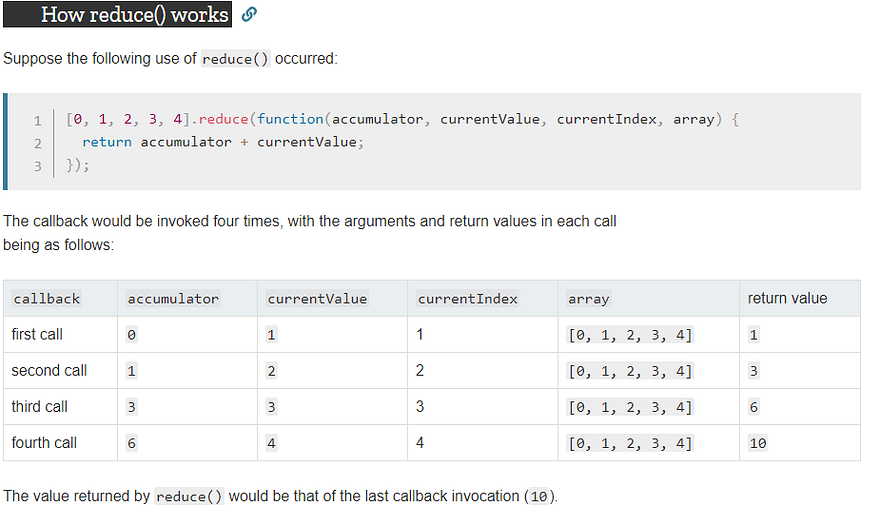
The snippet below shows how the **reduce()** method works with all four
arguments.
**source: MDN Docs**
More insights into the **reduce()** method and various ways of using it can be
found [here](https://medium.freecodecamp.org/reduce-f47a7da511a9) and
[here](https://developer.mozilla.org/en-US/docs/Web/JavaScript/Reference/Global_Objects/Array/Reduce).
### forEach()
This method is good for iterating through an array.
It applies a function on all items in an array
const colors = ['green', 'yellow', 'blue'];
colors.forEach((item, index) => console.log(index, item));
// returns the index and the every item in the array
// 0 "green"
// 1 "yellow"
// 2 "blue"
iteration can be done without passing the index argument
const colors = ['green', 'yellow', 'blue'];
colors.forEach((item) => console.log(item));
// returns every item in the array
// "green"
// "yellow"
// "blue"
### every()
This method checks if all items in an array pass the specified condition and
return `true` if passed, else `false`.
> check if all numbers are positive
const numbers = [1, -1, 2, 3];
let allPositive = numbers.every((value) => {
value >= 0;
})
console.log(allPositive);
### some()
This method checks if an item (one or more) in an array pass the specified
condition and return true if passed, else false.
> c*hecks if at least one number is positive*
const numbers = [1, -1, 2, 3];
let atLeastOnePositive = numbers.some((value) => {
value >= 0;
})
console.log(atLeastOnePositive);
### includes()
This method checks if an array contains a certain item. It is similar to
`.some()`, but instead of looking for a specific condition to pass, it checks if
the array contains a specific item.
let users = ['paddy', 'zaddy', 'faddy', 'baddy'];
users.includes('baddy'); // returns true
If the item is not found, it returns `false`
*****
There are more array methods, this is just a few of them. Also, there are tons
of other actions that can be performed on arrays, try checking MDN docs
[here](https://developer.mozilla.org/en-US/docs/Web/JavaScript/Reference/Global_Objects/Array/)
for deeper insights.
### Summary
* **toString()** converts an array to a string separated by a comma.
* **join()** combines all array elements into a string.
* **concat** combines two arrays together or add more items to an array and then
return a new array.
* **push()** adds item(s) to the end of an array and **changes** the original
array.
* **pop()** removes the last item of an array and **returns** it
* **shift()** removes the first item of an array and **returns** it
* **unshift()** adds an item(s) to the beginning of an array and **changes** the
original array.
* **splice()** **changes** an array, by adding, removing and inserting elements.
* **slice()** **copies** a given part of an array and returns that copied part as
a new array. **It does not change the original array.**
* **split()** divides a string into substrings and returns them as an array.
* **indexOf()** looks for an item in an array and returns **the index** where it
was found else it returns `-1`
* **lastIndexOf()** looks for an item from right to left and returns the last
index where the item was found.
* **filter()** creates a new array if the items of an array pass a certain
condition.
* **map()** creates a new array by manipulating the values in an array.
* **reduce()** calculates a single value based on an array.
* **forEach()** iterates through an array, it applies a function on all items in
an array
* **every()** checks if all items in an array pass the specified condition and
return true if passed, else false.
* **some()** checks if an item (one or more) in an array pass the specified
condition and return true if passed, else false.
* **includes()** checks if an array contains a certain item.
*****
Let’s wrap it here; Arrays are powerful and using methods to manipulate them
creates the Algorithms real-world applications use.
Let's do a create a small function, one that converts a post title into a
urlSlug.
> **URL slug** is the exact address of a specific page or post on your site.
When you write an article on **[Hashnode](https://hashnode.com)** or any other writing platform, your post title is automatically converted to a slug with white spaces removed, characters
turned to lowercase and each word in the title separated by a hyphen.
Here’s a basic function that does that using some of the methods we learnt just
now.
```
const url = 'https://bolajiayodeji.com/'
const urlSlug = (postTitle) => {
let postUrl = postTitle.toLowerCase().split(' ');
let postSlug = `${url}` + postUrl.join('-');
return postSlug;
}
let postTitle = 'Introduction to Chrome Lighthouse'
console.log(urlSlug(postTitle));
// https://bolajiayodeji.com/introduction-to-chrome-lighthouse
```
in `postUrl`, we convert the string to lowercase then we use the **split()**
method to convert the string into substrings and returns it in an array
["introduction", "to", "chrome", "lighthouse"]
in `post slug` we join the returned array with a hyphen and then concatenate it
to the main `url`.
let postSlug = `${url}` + postUrl.join('-');
postUrl.join('-') // introduction-to-chrome-lighthouse
That’s it, pretty simple, right? :)
*****
If you’re just getting started with JavaScript, you should check this repository [here](https://github.com/BolajiAyodeji/js-code-snippets), I’m compiling a list of basic JavaScript snippets ranging from
* Arrays
* Control flow
* Dom
* Functions
* Objects
* Operators
Thank you for reading, got any questions or views? Let's discuss in the comments.